Quick Start
Learn how to get the required report data and complete your operations diagnostic in 3 steps
STEP 1
Download Reports
Download the required Amazon report files from Seller Central
STEP 2
Upload & Configure
Upload files and set marketplace, date range, and other parameters
STEP 3
View Results
Automatically calculated and displayed on the Dashboard — exportable to Excel
We recommend downloading reports in CSV format (TXT may have parsing issues, XLSX may have encoding problems). For first-time users, we suggest downloading all reports from Seller Central in English.
We recommend switching your Seller Central language to English before downloading business data reports. English reports have the best column name compatibility and the highest parsing accuracy.
We recommend analyzing data on a calendar month basis (e.g., 2025/01/01 ~ 2025/01/31). Monthly analysis allows you to track operational trends more clearly, compare advertising performance, and align with Amazon's billing cycles.
We do not recommend mixing marketplaces in a single analysis. Different marketplaces use different currencies and report formats, which may lead to inaccurate results.
Seller Central Reports
The following 9 reports are downloaded from Amazon Seller Central. The first 6 are required.
Download Path
Menu › Reports › Business Reports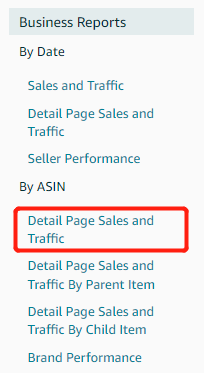
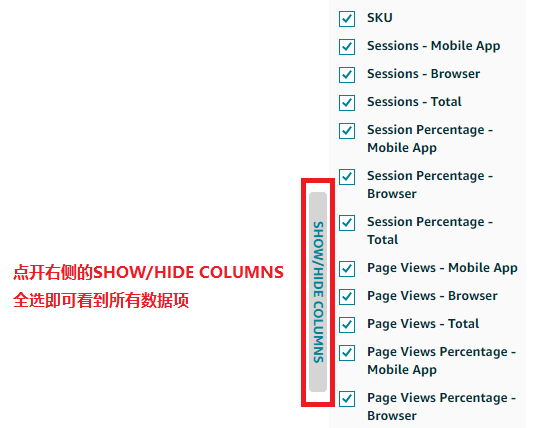
Select the SKU-level report (Detail Page Sales and Traffic under By ASIN), not the By Parent Item report. We recommend clicking SHOW/HIDE COLUMNS and selecting all columns.
Download Path
Menu › Reports › Fulfillments › Inventory LedgerDownload Options
Type: Summary View / Location: Country / Time Period: Daily
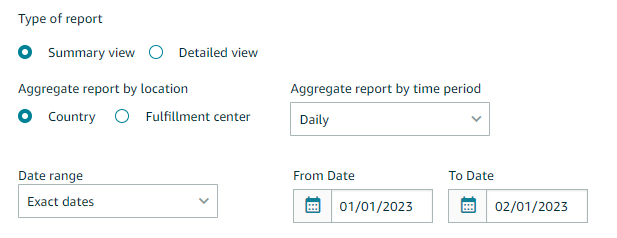
We recommend importing a full year of data. The system will automatically extract the data for your specified time range.
Download Path
Menu › Payments › Reports RepositoryDownload Options
Account Type: All / Report Type: Transaction
The Transaction Report language is determined by the marketplace's local language, not the Seller Central interface language. You do not need to change the date format — the system will detect it automatically.
User-Provided Data
The following 4 data sheets are optional and should be filled in by the user using the provided template format
Ready to Go?
Once you have your reports downloaded, upload your files to start the analysis
Operations Diagnostic Tool (Web Edition) Quick Start Guide · V1.0